

The Production Module in Business Central is the point where manufacturing planning becomes real, measurable, and financially accountable execution. While manufacturing setup defines the structure of products and processes, the Production Module governs how those structures are used in day-to-day operations. It controls how production orders are created, how materials and capacity are consumed, how output is reported, and how costs finally flow into inventory and finance.
In practical terms, the Production Module answers the most critical operational question in any manufacturing organization:
“What exactly did we produce, how did we produce it, and what did it really cost?”
Production as a Business Process, Not Just a System Feature
Production is not a single action. It is a sequence of controlled steps, each with operational and financial consequences. Business Central mirrors this reality by breaking production into clearly defined stages—planning, creation, release, execution, and posting—each governed by system logic and internal controls.
This structured approach prevents common real-world problems such as producing without materials, misreporting inventory, losing cost visibility, or posting incorrect financial entries. The Production Module ensures that nothing is produced casually—every action is traceable, auditable, and costed.
From Demand to Production Order Creation
Every production activity begins with demand. Demand may come from a sales order, a sales forecast, or a replenishment policy that requires stock to be produced internally. However, demand alone does not directly create production orders. It must first pass through the planning engine, where Business Central evaluates demand against existing inventory, safety stock, lead times, and capacity.
Once planning runs (via MPS or MRP), the system generates Planned Production Orders. At this stage, these orders are still proposals. They represent what should be produced, not what will be produced. Planners can review quantities, due dates, routing choices, and component availability before taking the next step.
Manual vs Planned Creation of Production Orders
Production orders in Business Central can be created in two main ways. The first is planned creation, where MRP or MPS generates orders automatically based on demand. The second is manual creation, where a user explicitly creates a production order for a specific item and quantity.
Business Central keeps separate list pages for the main production-order statuses. Selecting the correct list matters because planning, execution, and completion are intentionally separated.
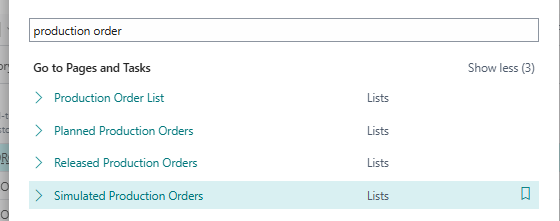
Regardless of how the order is created, once it exists, the system immediately applies the item’s Production BOM and Routing. This automatically determines required components, expected quantities, operations, capacity needs, and standard costs. The production order is no longer just a quantity—it becomes a complete production blueprint.
Firm Planned Production Orders: Commitment Without Execution
Before production begins, many organizations use Firm Planned Production Orders. This status represents a management decision that the order will be produced, but execution has not yet started. At this stage, planners may still reschedule, modify quantities, or resolve material shortages without impacting the shop floor.
Firm Planned status is especially important in environments where coordination between procurement, production, and sales is critical. It provides stability without operational lock-in.
Releasing the Production Order: The Point of Execution
Releasing a production order is one of the most critical actions in the Production Module. When a production order is Released, it officially enters execution. From this point forward, the system assumes that production activities will occur, and controls are enforced accordingly.
Upon release, Business Central checks material availability, reserves components, books capacity against work centers or machine centers, and allows warehouse picks to be created if required. Operationally, this signals the shop floor that production can begin. Financially, it marks the start of Work in Process (WIP) .
This step ensures discipline. Production cannot proceed without confirmation that materials, machines, and time are realistically available.
Production Order Structure After Release
Once released, a production order contains several critical elements. It includes production order lines for the finished item, component lines for raw materials, routing lines for operations, and capacity allocations. Each of these elements is now active and ready to be consumed or posted against.
At this stage, the production order becomes the single source of truth for production execution.
How Production Connects to Other Business Areas
A production order does not operate in isolation. Its dates, component demand, movements, and posted output affect records owned by several other teams.
• Planning and sales supply the demand and due dates used when replenishment is calculated.
• Purchasing can replenish components that are unavailable for the planned quantity.
• Inventory and warehouse control where components are picked and where finished output is placed.
• Manufacturing records consumption, capacity, scrap, and output against the order.
• Finance receives the resulting item and capacity costs through posting.
When troubleshooting a production result, follow the related records rather than checking only the order header. A missing component posting or an unexpected output quantity can explain both inventory differences and the cost ultimately posted to the ledger.
Execution Phase: Recording What Actually Happens
Execution is where the Production Module becomes operationally intense. This phase captures actual shop floor activity, not estimates or plans. Business Central supports this through production journals, which act as controlled entry points for real-world data.
The two most important journals during execution are the Consumption Journal and the Output Journal. Together, they ensure that both input and output are recorded accurately.
Posting Consumption: Issuing Raw Materials to Production
The Consumption Journal is used to record the actual usage of raw materials during production. When consumption is posted, inventory quantities for components are reduced, and their cost is transferred into WIP.
Consumption can be recorded in two ways. In manual consumption, users explicitly enter the quantities consumed. In automatic consumption (backflushing), the system calculates consumption based on output quantities and BOM standards.
Posting consumption is a critical control point. It ensures that materials are not silently lost or misused. Every unit consumed is traceable to a specific production order.
Posting Output: Recording Finished or Semi-Finished Goods
The Output Journal records what production actually produced. This includes finished goods, semi-finished goods, scrap, and the time spent on operations. When output is posted, quantities are moved closer to completion, and capacity costs are absorbed.
Output posting directly impacts WIP and capacity utilization. It reflects labor time, machine time, and overhead application. Without output posting, production remains incomplete both operationally and financially.
Work in Process (WIP) During Execution
As consumption and output are posted, costs accumulate in WIP accounts. WIP represents the value of production that has started but not yet been completed. Business Central manages WIP automatically, ensuring that costs are neither prematurely expensed nor incorrectly capitalized.
This mechanism is essential for accurate financial reporting, especially when production spans multiple accounting periods.
Finishing the Production Order
Once all required output has been posted and production is complete, the production order can be Finished. Finishing the order signals that no further consumption or output is expected.
At this point, Business Central clears WIP and transfers accumulated costs to finished goods inventory. Any variances between expected and actual costs are calculated and posted automatically.
Posting and Financial Impact
Posting in the Production Module has deep financial implications. Each posting creates Item Ledger Entries, Value Entries, and General Ledger Entries. Raw material inventory decreases, finished goods inventory increases, WIP is cleared, and cost variances are recognized.
This integration ensures that operations and finance are always synchronized. There is no need for reconciliation between production and accounting—the system enforces consistency by design.
Variances and Performance Analysis
Once production is posted, Business Central calculates variances. These variances highlight differences between planned standards and actual execution. Material overruns, inefficient labor usage, machine downtime, and scrap all become visible through variance analysis.
These insights are critical for management decision-making. They allow organizations to improve processes, adjust standards, and control costs proactively.
Production as a Continuous Control Loop
The Production Module is not just about producing goods—it is about learning from production. Each completed production order feeds data back into planning, costing, and performance analysis. Over time, this creates a continuous improvement loop where planning accuracy improves, costs stabilize, and execution becomes more predictable.
Example: End-to-End Production Order Creation & Posting in Business Central
This example demonstrates how a Production Order is created, executed, and posted, and how inventory and finance are impacted at each step in Microsoft Dynamics 365 Business Central.
Business ScenarioA company manufactures Office Chairs internally.
• Finished Item: OFF-CHAIR
• Production BOM includes:
o Seat
o Backrest
o Legs
o Screws
• Routing includes:
o Assembly
o Quality Check
A confirmed Sales Order for 50 Office Chairs creates demand for production.
Step 1: Demand Creates the Need for ProductionA sales order is released for 50 Office Chairs.
Available inventory is insufficient, so the planning engine identifies the shortage and suggests internal production.
Planning run generates a Planned Production Order for 50 units.
👉 No inventory or finance impact yet.
The planner reviews the planned production order and converts it to a Firm Planned Production Order.
At this stage:
• Quantity = 50
• Due date is confirmed
• BOM and Routing are attached
• Materials and capacity are visible but not locked
👉 This is still a planning commitment, not execution.
Step 3: Releasing the Production OrderThe production order is Released.
System actions:
• Required raw materials are checked and reserved
• Capacity is booked on work centers
• Warehouse can create picks (if enabled)
👉 This is the start of execution
👉 WIP tracking begins from this point
Step 4: Posting Material ConsumptionProduction starts on the shop floor.
Raw materials are issued using the Consumption Journal.
Example:
• Seat: 50 pcs
• Backrest: 50 pcs
• Legs: 200 pcs
• Screws: 400 pcs
When consumption is posted:
• Raw material inventory decreases
• Material cost is transferred to WIP
• Item Ledger Entries and Value Entries are created
👉 Production has started financially, not just physically.
Step 5: Posting Output (Production Completion)After assembly, finished chairs are ready.
Using the Output Journal, production reports:
• Output Quantity: 50
• Scrap: 2 units (damaged during assembly)
• Time spent on operations
When output is posted:
• Capacity costs are applied
• Labor and machine costs move into WIP
• Output quantity is registered against the production order
👉 Production progress is now recorded operationally and financially.
Step 6: Finishing the Production OrderOnce all expected output and consumption are posted, the production order is Finished.
System actions:
• WIP is cleared
• Total production cost is calculated
• Variances (material, capacity, overhead) are posted
• Finished goods inventory is updated
Finished Item Inventory:
• Office Chair: 48 pcs (after scrap)
👉 Production is now fully completed and settled.
Step 7: Financial Impact SummaryAfter posting and finishing:
• Raw material inventory ↓
• Finished goods inventory ↑
• WIP balance = 0
• Cost variances posted to G/L
• Inventory valuation updated automatically
No manual accounting entries are required.
👉 Operations and Finance remain perfectly aligned.
This example clearly shows:
• How production starts from demand
• How a production order is created and released
• How consumption and output are posted
• How WIP accumulates and clears
• How inventory and finance are updated automatically
Summary
The Production Module in Business Central is the execution engine of manufacturing. It governs how production orders are created, released, executed, and posted. It ensures that every unit produced is traceable, every cost is accounted for, and every operational decision has financial visibility.
Without the Production Module, manufacturing remains theoretical. With it, manufacturing becomes controlled, measurable, and profitable.
Practical check: Compare manual and planned production-order creation
Create one order manually for a fixed demonstration quantity. Then create separate demand for the same item and run the relevant planning worksheet to see whether policy and availability generate a proposal.
Steps and evidence to inspect
- Record source, quantity, due date, and reservation/order-tracking links for both orders.
- Refresh and release only the controlled test order, then post consumption and output.
- Check item ledger/value entries and remaining component quantity before changing the order to Finished.
Expected result
The manual order exists because a user decided to create it; the planned proposal is explained by demand and item planning parameters. Posted output increases the parent item and consumption reduces components.
If the result is different
No planning suggestion usually means demand, replenishment system, planning parameters, date horizon, or existing supply already covers the need. Do not create duplicates until order tracking is understood.
Version and implementation boundary
Planning logic can be materially affected by SKU, location, variants, reservations, and dampener settings. Use representative data before drawing conclusions from a single demo.
Authoritative reference: Microsoft Learn — Production orders. The scenario and interpretation above are original to ScrutnLearn.