

This page explains what pages are in AL, why they exist, and how they act as the primary interaction layer between users and business data in Business Central. Pages do not store data or define business processes; instead, they control how users view, enter, and navigate data that already exists in tables.
Understanding pages correctly is critical because most user-facing behavior in Business Central happens through pages. If pages are misunderstood, developers often place logic in the wrong layer, leading to unstable and hard-to-maintain solutions.
What Is a Page in AL?
A page in AL is a user interface object that displays data from one or more tables and allows users to interact with that data in a controlled way. Pages act as a bridge between stored business data and human interaction.
A page defines:
• What data is shown to the user
• How data is grouped and laid out
• Which actions users can perform
• When records can be created, modified, or deleted
A page does not:
• Store data
• Own business rules
• Control posting logic
Those responsibilities belong to tables and codeunits.
Why Pages Exist in Business Central
Business Central is designed to be used by non-technical users. Raw database tables are not suitable for direct interaction. Pages exist to:
• Present business data in a readable format
• Guide users through correct data entry
• Enforce UI-level rules before data reaches the table
• Reduce errors through layout, visibility, and enablement
Pages allow the system to be user-friendly without compromising data integrity.
Relationship Between Pages and Tables
Every page is bound to a data source, usually a table. This relationship is defined using the SourceTable property. Pages never create their own data model; they only reflect and manipulate data defined elsewhere.
Because of this:
• A page cannot exist meaningfully without a table
• Multiple pages can exist for the same table
• Different pages can present the same data differently for different roles
This separation ensures that data structure remains stable even if UI changes.
Common Types of Pages in AL
Pages are designed around user intent rather than technical structure. Each page type serves a specific interaction purpose.
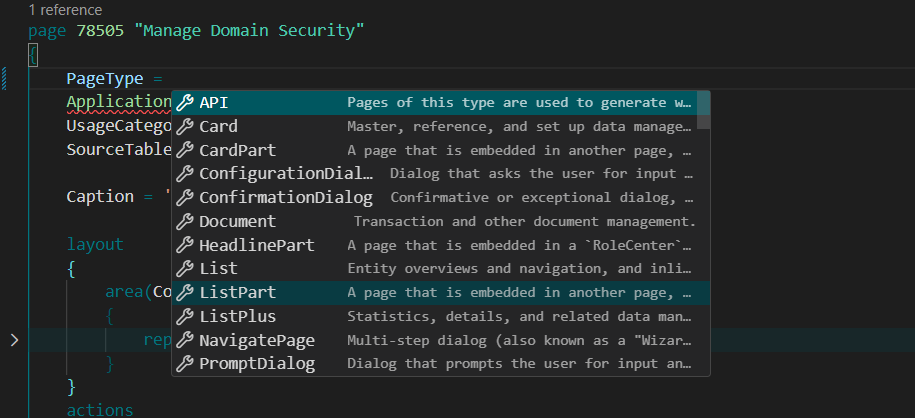
Visual Studio Code exposes the available PageType values through AL IntelliSense. Treat the list as a design choice: select the type that matches how the user will browse, edit, embed, or complete the task.
Card pages are used to view and edit a single record in detail. They are commonly used for master data such as customers, vendors, and items.
They allow:
• Full visibility of all related fields
• Structured grouping of information
• Detailed editing of a single entity
Simple Page Example
page 50110 "Customer Feedback Card"
{
    PageType = Card;// change this as per your type, whether it is card part, list part, list, factbox, standard dialogue etc.
    SourceTable = "Customer Feedback";
    ApplicationArea = All;
    UsageCategory = Administration;

    layout
    {
        area(Content)
        {
            group(General)
            {
                field("Entry No."; "Entry No.")
                {
                    ApplicationArea = All;
                }

                field("Customer No."; "Customer No.")
                {
                    ApplicationArea = All;
                }

                field("Feedback Text"; "Feedback Text")
                {
                    ApplicationArea = All;
                }

                field("Created Date"; "Created Date")
                {
                    ApplicationArea = All;
                    Editable = false;
                }
            }
        }
    }
}
List pages display multiple records in a tabular format. They are typically used for searching, filtering, and selecting records.
They support:
• Sorting and filtering
• Quick overview of many records
• Navigation to card or document pages
Document pages represent business documents with a header–line structure, such as sales orders or purchase invoices.
They are designed to:
• Guide users through transactional workflows
• Separate header information from line details
• Support posting and document lifecycle actions
Worksheet and journal pages are used for batch entry and processing, especially in finance and inventory.
They support:
• Rapid data entry
• Validation across multiple lines
• Posting or processing in bulk
Structure of a Page in AL
A page definition typically consists of:
• Page properties
• Layout definition
• Actions
• Optional triggers
Each part serves a different purpose and should be kept cleanly separated.
Page Properties (High-Level Understanding)Page properties define overall behavior of the page. They control:
• Page type
• Data source
• Editability
• Insert, modify, and delete permissions
• Visibility and application scope
These properties are evaluated before any code runs and should be the first tool used to control page behavior.
Page LayoutThe layout section defines how data is presented visually. It controls:
• Grouping of fields
• Ordering of information
• Whether data appears as a list, card, or document
Layouts should be designed to:
• Follow business logic
• Reduce cognitive load
• Prevent incorrect data entry
Layout decisions have a major impact on usability.
Actions on PagesActions represent things users can do from a page. These include:
• Creating records
• Navigating to related data
• Running processes
• Posting or validating information
Actions should:
• Be clearly named
• Be enabled or disabled based on context
• Guide users toward correct system usage
Pages should guide behavior, not just react to errors.
Sample example:
Example: Adding Action
actions
{
    area(Processing)
    {
        action(ShowCustomer)
        {
            ApplicationArea = All;
            Caption = 'Open Customer';
            Image = Customer;

            trigger OnAction()
            var
                CustomerRec: Record Customer;
            begin
                if CustomerRec.Get("Customer No.") then
                    Page.Run(Page::"Customer Card", CustomerRec);
            end;
        }
    }
}
Pages support triggers such as:
• OnOpenPage
• OnAfterGetRecord
• OnNewRecord
These triggers should be used sparingly and only for:
• UI initialization
• Calculated display values
• Context-sensitive behavior
Business rules and validations should not live primarily in page triggers.
Role of Pages in Upgrade Safety
Pages are among the most frequently customized objects, but direct modification of standard pages is not allowed. Instead:
• Standard pages remain untouched
• Custom behavior is added using page extensions (next topic)
• UI customizations remain upgrade-safe
This design allows Microsoft to evolve the UI without breaking partner solutions.
Common Beginner Mistakes With Pages
Developers new to AL often:
• Put business logic in page triggers
• Use pages to enforce data integrity
• Overuse actions instead of workflow
• Treat pages as data owners
These mistakes lead to fragile solutions and should be avoided.
Summary
Pages in AL define how users interact with business data, not how data is stored or processed. They act as a controlled interface layer that balances usability with data integrity.
A well-designed page:
• Makes correct behavior easy
• Prevents common errors
• Reduces training effort
• Keeps logic where it belongs
Understanding pages properly is essential before learning how to extend or customize them.
Practical check: Create list and card pages over one inspection table
Use a small Inspection table with number, item number, inspection date, and status. Create a list for navigation and a card for detailed editing.
Steps and evidence to inspect
- Set SourceTable on both pages and choose page types that match browse versus edit behaviour.
- Expose fields with ApplicationArea and add a list action that opens the selected card.
- Create a record, edit it on the card, return to the list, and confirm the same stored record changed.
Expected result
Both pages show one source record, not duplicated page data. A table-level validation is enforced even if a later API or codeunit writes the record.
If the result is different
Blank pages often mean missing records, filters, SourceTableView, or permissions. Unsaved UI values can come from delayed insert or variable-bound controls; inspect the binding before adding Modify calls everywhere.
Version and implementation boundary
Page behaviour varies by page type, client, profile, and personalisation. Test keyboard, narrow viewport, and permission-limited users as well as the developer account.
Authoritative reference: Microsoft Learn — Page object. The scenario and interpretation above are original to ScrutnLearn.