
This page is the entry point into AL development for Microsoft Dynamics 365 Business Central. It is not meant to teach syntax, objects, or coding patterns in detail. Instead, it is designed to help learners understand what AL is, why it exists, where it fits in Business Central, and how to mentally approach AL development before writing a single line of code.
Think of this page as the orientation session before stepping into actual development.
Why AL Exists in Business Central
Business Central is a full ERP system with standard functionality that fits most business scenarios. However, real companies often have:
• Unique business rules
• Country-specific requirements
• Integration needs
• Custom validations or automations
AL exists to extend and adapt Business Central safely, without changing the base application. It allows developers to add new functionality or modify behavior while keeping the core system upgrade-safe.
This is a key principle:
AL does not modify standard code; it extends it.
What AL Is (In Simple Terms)
AL is the programming language used to build extensions for Business Central. These extensions can:
• Add new tables, pages, reports, and codeunits
• Extend existing objects
• Subscribe to system events
• Add validations, calculations, and automation
• Integrate with external systems
AL is tightly integrated with Business Central’s data model and business logic. It is not a general-purpose programming language; it is ERP-specific by design.
How AL Fits into the Business Central Architecture
Business Central consists of:
• Standard application objects (tables, pages, codeunits, reports)
• A platform layer managed by Microsoft
• Custom extensions written in AL
AL sits outside the base application and interacts with it through:
• Object extensions
• Events and event subscribers
• APIs and integrations
This architecture ensures:
• Safe upgrades
• Clear separation between standard and custom logic
• Predictable system behavior
Understanding this separation is critical before learning AL syntax.
AL Development Is Not Just “Coding”
A common beginner mistake is to treat AL like a normal programming language and jump straight into writing code. In reality, AL development requires understanding business processes first.
Before writing AL code, a developer must understand:
• Which module is involved (Sales, Purchase, Inventory, Finance, Production, Jobs, etc.)
• Which standard objects already exist
• Where the business logic is triggered
• Whether customization is really required or configuration is sufficient
AL developers are not just programmers; they are ERP solution builders.
Typical Use Cases for AL
AL is used when configuration alone is not enough. Common use cases include:
• Adding custom fields to standard pages
• Validating business rules during posting
• Automating document creation
• Extending reports
• Creating integrations with external systems
• Building custom modules or utilities
Each use case should start with the question:
“Can this be achieved through standard setup?”
AL should be the last step, not the first.Development Environment Overview (High-Level)
AL development is done using:
• Visual Studio Code
• The AL Language extension
• A Business Central environment (cloud or on-prem)
At this stage, it is enough to know that:
• Code is written locally
• Extensions are published to Business Central
• Changes are versioned and upgrade-safe
Detailed setup and tooling will be covered in later AL documents.
How AL Developers Think (Mindset)
Successful AL developers follow a specific mindset:
• Understand the business problem first
• Locate the correct standard object
• Use events instead of modifying behavior directly
• Write minimal, targeted code
• Respect standard Business Central logic
This mindset prevents unstable solutions and upgrade issues.
What You Should Know Before Learning AL
Before moving deeper into AL, learners should be comfortable with:
• Core Business Central modules
• Posting logic and document lifecycles
• ERP flow (sales → inventory → finance)
• Difference between setup and customization
AL builds on these concepts; it does not replace them.
Summary
Getting started with AL is about understanding where AL fits, not writing code immediately. AL is a powerful extension language designed specifically for Business Central, and using it correctly requires both technical skill and business understanding.
Once this foundation is clear, learning AL syntax, objects, and patterns becomes far more intuitive and meaningful.
Practical check: Prove the editor-to-sandbox path with a harmless page extension
Add one informational action to a sandbox Customer List page. The action may show a message; it should not modify customer data.
Steps and evidence to inspect
- Create the project and review app.json plus launch.json instead of accepting unknown defaults.
- Download symbols, compile the package, and publish with the debugger.
- Run the action, stop debugging, then review the installed extension and package version.
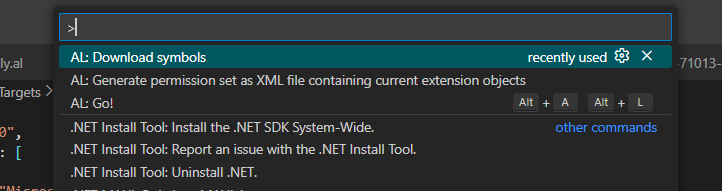
After checking the target environment and dependency versions, run the symbol download from the Visual Studio Code Command Palette. This retrieves the application symbols that AL needs for compilation and IntelliSense.
Expected result
The action appears only after the extension is deployed, runs in the Business Central client, and can be traced back to the source package and app version.
If the result is different
Authentication errors belong to the connection; missing symbols belong to dependencies/version; a missing action often belongs to ApplicationArea or page placement. Separate those layers before retrying.
Version and implementation boundary
Development publishing is for sandboxes. Production deployment requires controlled packages, permissions, versioning, testing, and an agreed release process.
Authoritative reference: Microsoft Learn — Get started with AL. The scenario and interpretation above are original to ScrutnLearn.