
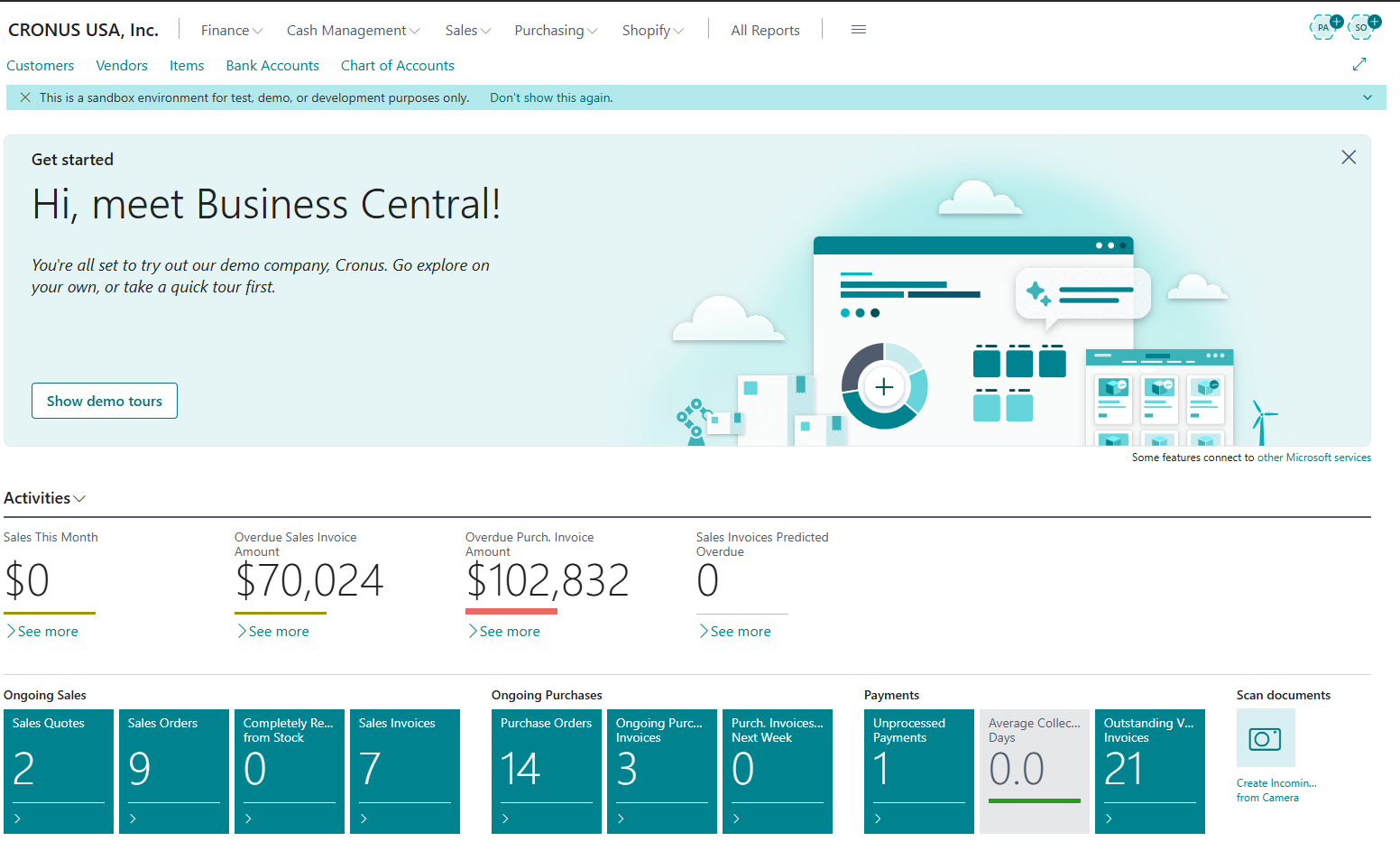
Microsoft Dynamics 365 Business Central is Microsoft's ERP application for running core company processes in a shared system. A business can use it to manage customers, vendors, items, orders, inventory, accounting entries, and operational reporting without keeping a separate record for every department.
The practical value is the connection between those records. Posting a purchase receipt can change stock availability; posting a sales invoice can update customer balances, item entries, and general-ledger accounts. This article explains that shared-data idea before introducing individual modules.
What is Business Central in Simple Terms?
In simple words, Business Central is software that helps run a business efficiently.
Instead of using separate tools for accounting, inventory, sales, and reporting, Business Central brings everything together in one system. This reduces manual work, errors, and data duplication.
Think of Business Central as the central brain or control system of a business, where all operational data is stored, processed, and shared across departments.
Understanding Business Central at a Fundamental Level
At its core, Business Central acts as a central database and process engine for a business. This means that all important business information—such as customers, vendors, items, prices, and financial data—is stored in one shared system instead of being spread across multiple tools or spreadsheets.
Every transaction in Business Central follows a connected flow. For example, when a sales invoice is created, it does not just record a sale. It automatically updates customer balances, inventory levels, revenue accounts, and financial reports. Similarly, when a purchase order is posted, it updates vendor records, inventory quantities, and accounting entries at the same time.
Because all transactions flow through a single, common system, different departments always work with the same data. Finance, sales, purchasing, and operations do not need to manually reconcile information or re-enter data.
Unlike standalone accounting software, which mainly focuses on recording financial entries, Business Central connects business processes end-to-end. A single action can trigger multiple updates across the system, ensuring accuracy, consistency, and real-time visibility into business performance.
Evolution of Business Central
Business Central is the modern evolution of Microsoft Dynamics NAV, which was earlier known as Navision.
Business Central belongs to the product family that many long-time users still refer to as Navision. Navision began as an independently developed ERP product, later became a Microsoft product, and evolved through versions branded as Microsoft Dynamics NAV.
The current Business Central name reflects a newer application and extension model rather than a simple label change. Organizations can encounter both the online service and on-premises deployments, while developers work in AL and package customizations as extensions instead of modifying the old base application directly.
Microsoft redesigned NAV to:
• Support cloud deployment
• Integrate deeply with Microsoft 365 tools
• Offer a modern, web-based user interface
• Enable extensibility through AL and extensions instead of core modifications
Today, Business Central is continuously updated by Microsoft with new features, security improvements, and performance enhancements, making it suitable for modern, cloud-first businesses.
Why Was Business Central Created?
Microsoft introduced Business Central to replace older, fragmented business systems and provide a cloud-first ERP that is:
• Easy to use
• Scalable as the business grows
• Integrated with Microsoft tools like Excel, Outlook, and Teams
It evolved from Microsoft Dynamics NAV (Navision) and was modernized to meet today’s cloud, automation, and integration needs.
Key Features of Business Central
Business Central includes a wide range of features that help businesses manage their day-to-day operations in an organized and connected way. Each feature focuses on a specific business area, but all of them work together within one system.
Financial Management in Business CentralFinancial management is the foundation of Business Central. It helps businesses track where money comes from, where it is spent, and how financially healthy the organization is.
With financial management features, businesses can:
• Record daily financial transactions using the General Ledger
• Manage customer payments and vendor bills through Accounts Receivable and Payable
• Reconcile bank statements to ensure accuracy
• Generate financial reports to understand profit, loss, and cash flow
These features ensure that financial data stays accurate and always up to date.
Sales and Purchasing in Business CentralSales and purchasing features manage how a business sells to customers and buys from vendors.
On the sales side, Business Central helps create and manage:
• Sales quotes, orders, and invoices
• Customer information and pricing
• Discounts and payment terms
On the purchasing side, it helps handle:
• Purchase orders and vendor invoices
• Supplier information
• Cost tracking and approvals
This ensures that sales, purchasing, inventory, and finance stay connected.
Inventory and Supply Chain ManagementInventory and supply chain features help businesses track and control their stock.
Business Central allows businesses to:
• Manage items and warehouses
• Monitor stock levels and availability
• Track inventory value and movement
• Plan reordering based on demand
• Apply different inventory costing methods
This helps avoid overstocking, shortages, and inventory-related losses.
Operations and Project ManagementOperations management features are useful for businesses that handle projects, jobs, or services.
With these features, businesses can:
• Plan and manage jobs or projects
• Allocate resources such as people and materials
• Track time and expenses
• Automate workflows and approvals
This helps ensure projects stay on budget and on schedule.
Reporting and Business InsightsReporting and insights help businesses understand their data and make better decisions.
Business Central provides:
• Built-in reports for daily operations
• Real-time dashboards showing key metrics
• Integration with Power BI for advanced analytics
• Clear visibility into business performance
These insights allow managers to identify trends, problems, and opportunities early.
Why These Features MatterAll these features are fully integrated, meaning:
• Data is entered once and reused everywhere
• Errors caused by manual entry are reduced
• Business processes run more smoothly
• Decision-making becomes faster and more accurate
Together, these features make Business Central a complete ERP solution rather than just accounting software.
Is Business Central an ERP System?
Yes, Business Central is a full ERP system.
An ERP system integrates multiple business functions into a single platform. Business Central does this by combining finance, operations, sales, supply chain, and reporting into one unified solution.
It is designed for small and mid-sized businesses that need a complete system without extreme complexity.
What Business Central Is Not
Business Central is more than basic accounting software, but it is not designed for very large enterprises that require highly customized or industry-specific ERP systems.
It is best suited for organizations that need an integrated, scalable ERP solution without heavy technical overhead.
A Simple Real-World Example
Imagine a small distribution company receives a customer order.
• A sales order is created in Business Central
• Inventory availability is checked automatically
• Stock levels are updated when the order is shipped
• An invoice is generated and posted to accounts
• Financial reports are updated instantly
All of this happens inside Business Central without manual data re-entry or using multiple systems.
Cloud vs On-Premise Business Central
Business Central is primarily a cloud-based ERP, but it also supports on-premise deployment.
Cloud Version• Hosted by Microsoft
• Automatic updates
• Accessible from anywhere
• Lower infrastructure maintenance
• Installed on local servers
• Full control over updates
• Suitable for specific compliance needs
Both deployment options use the same core Business Central functionality. Most new customers choose the cloud version due to flexibility and lower operational overhead.
Who Should Use Business Central?
Business Central is ideal for:• Small and medium-sized businesses
• Growing companies that have outgrown basic accounting software
• Organizations looking to replace disconnected systems
• Businesses using Microsoft products heavily
It is widely used across industries such as manufacturing, retail, distribution, and professional services.
Who Uses Business Central in Real Life?
Business Central is used by different types of users:• Business owners and managers to monitor performance and growth
• Finance and accounting teams for daily postings and reporting
• ERP consultants for implementation and optimization
• Developers for building extensions and integrations
This makes Business Central both a business solution and a professional ERP platform.
How Business Central Fits into Microsoft Dynamics 365
Business Central is part of the Microsoft Dynamics 365 ecosystem.
It integrates seamlessly with:• Microsoft Excel
• Outlook
• Teams
• Power Platform (Power BI, Power Automate, Power Apps)
This allows businesses to extend functionality and automate processes without heavy custom development.
Is Business Central Suitable for Beginners?
Yes, Business Central is suitable for beginners, even for users who are new to ERP systems.
Microsoft designed Business Central with ease of use in mind. Instead of showing all features at once, the system uses role-based dashboards. This means users only see information and actions related to their job role, such as finance, sales, or purchasing.
Business Central also provides a guided setup experience. New users are led step by step through company setup, basic configurations, and initial data entry.
With clear navigation, built-in help, documentation, and hands-on practice, most users learn Business Central gradually while using it in daily work.
Does Business Central Require a License?
Yes, Business Central is licensed per user. Microsoft offers different license types based on user roles and access levels.
Licensing is an important part of implementation and is usually handled during planning and setup.
What Will You Learn Next?
If you are new to Business Central, the next steps usually include:• Understanding Business Central architecture
• Exploring core modules
• Learning basic navigation
• Getting introduced to AL development
ScrutnLearn will guide you step by step through these topics.
Common Business Central Terms
• ERP – Enterprise Resource Planning system
• Posting – Recording transactions into financial accounts
• Master Data – Core data such as customers, vendors, and items
• Extension – Custom functionality added to Business Central
Frequently Asked Questions (FAQ)
What is Microsoft Dynamics 365 Business Central used for?Microsoft Dynamics 365 Business Central is used to manage core business operations such as finance, sales, purchasing, inventory, projects, and reporting. It helps businesses run daily processes efficiently from a single, integrated system.
Is Business Central only accounting software?No. While Business Central includes strong accounting features, it is a full ERP system . It goes beyond accounting by integrating operations, supply chain, sales, purchasing, inventory, and business intelligence.
What is the difference between Business Central and Dynamics NAV?Business Central is the modern, cloud-ready successor of Microsoft Dynamics NAV (Navision). While NAV was mainly on-premise, Business Central supports cloud deployment, regular updates, modern UI, and extensibility through AL and extensions.
Is Business Central suitable for small businesses?Yes. Business Central is specifically designed for small and mid-sized businesses . It scales as the business grows and replaces multiple disconnected tools with a single ERP platform.
Can beginners learn Business Central easily?Yes. Business Central is beginner-friendly due to role-based dashboards, guided setup, and integration with familiar Microsoft tools like Excel and Outlook. With structured learning, beginners can understand it step by step.
Is Business Central cloud-based or on-premise?Business Central is primarily cloud-based, hosted on Microsoft Azure. However, it also offers an on-premise version for organizations that require greater control or have specific compliance needs.
Does Business Central support customization?Yes. Business Central can be customized using the AL programming language and extensions. Customizations are upgrade-safe and do not modify the core system.
What industries use Business Central?Business Central is used across industries such as manufacturing, retail, distribution, wholesale, and professional services. Its flexibility allows it to adapt to different business models.
Do I need technical knowledge to use Business Central?Basic business users do not need technical knowledge to use Business Central. However, developers and consultants working on customization and integrations benefit from understanding AL and the system architecture.
Is Business Central part of Microsoft Dynamics 365?Yes. Business Central is part of the Microsoft Dynamics 365 suite and integrates with other Microsoft products such as Power BI, Power Automate, Excel, Outlook, and Teams.
Conclusion
Microsoft Dynamics 365 Business Central is a powerful ERP solution that helps businesses manage operations efficiently, reduce manual work, and gain better visibility into their data.
Whether you are a business user, consultant, or developer, understanding Business Central is the first step toward working with modern ERP systems.
Practical check: Evaluate one business process against standard capability
A growing wholesaler wants to replace separate accounting, order, and stock spreadsheets. Evaluate one order-to-cash path using a trial or sample environment.
Steps and evidence to inspect
- Map customer, item, availability, sales order, shipment, invoice, payment, and reporting needs.
- Demonstrate the standard path and record fit, configuration gap, extension gap, integration gap, and training gap separately.
- Review licence, localisation, deployment, data migration, and support ownership before recommending a next step.
Expected result
The decision note states where Business Central provides an integrated standard process and where further validation is required. It does not equate a successful demo with implementation readiness.
If the result is different
If every requirement is marked 'customise', revisit standard configuration and process change. If every requirement is marked 'standard', add exception cases and compliance evidence.
Version and implementation boundary
Capabilities, names, licensing, availability, and release plans change. Verify current Microsoft information and the target country/region before a purchase decision.
For the current product scope: consult the Microsoft Learn guide to Business Central functionality. The explanation here is a beginner's mental model for how shared records and posting connect those areas.