
The Sales module in Microsoft Dynamics 365 Business Central manages the complete process of selling goods and services to customers. It connects commercial agreements, operational execution, inventory movement, and financial accounting into a single controlled workflow.
Unlike simple invoicing systems, Business Central ensures that every sales-related action is traceable, auditable, and reflected correctly in inventory and financial records. This makes the Sales module one of the most critical components of the ERP system.
Main Topics Covered in the Sales Module
Before exploring individual workflows, it is important to understand the main functional areas that together form the Sales module. Each area represents a distinct responsibility within the sales lifecycle, from agreement creation to financial posting.
1. Sales Module in Business Central (Foundation)
This topic explains the core purpose and design philosophy of the Sales module. It focuses on how sales processes are structured within an ERP system and how Business Central enforces control through document-driven processing.
Key aspects covered include:
• Purpose of the Sales module
• Role in ERP architecture
• Relationship with Inventory, Finance, and Warehouse
• Document-driven processing model
2. Sales Documents and Their Purpose
Sales processing in Business Central is document-based. Each document exists for a specific reason and must be used correctly to avoid accounting and inventory inconsistencies. This section introduces the main sales documents and clarifies when and why each one is used.
Sales documents include:
• Sales Quote – A non-binding offer sent to a customer with proposed prices and terms. It does not affect inventory or financial ledgers and can be converted into a Sales Order once accepted.
• Sales Order – The confirmed commitment to sell goods or services to a customer. It drives shipment and invoicing and is the most commonly used sales document.
• Sales Invoice – The billing document sent to the customer requesting payment. Posting a sales invoice recognizes revenue and updates the customer's balance.
• Sales Credit Memo – Used to reverse or adjust a previously posted invoice, for example due to a return, pricing error, or discount. It reduces the customer's balance and reinstates inventory where applicable.
• Blanket Sales Order – A long-term agreement covering multiple deliveries over time. It is not shipped or invoiced directly but is released into individual Sales Orders as needed.
• Sales Return Order – Records goods returned by a customer. It manages the physical return of inventory separately from the financial credit memo process.
• Posted Sales Documents – Once a Sales Order, Invoice, Credit Memo, or Return Order is posted, Business Central creates a corresponding posted document (Posted Sales Invoice, Posted Sales Credit Memo, Posted Sales Shipment, Posted Return Receipt) that serves as a permanent, auditable record of the transaction.
3. Sales Workflow Lifecycle
The Sales workflow is not a single step but a series of controlled stages. Each stage serves a different business function and has a different system impact. Understanding this lifecycle helps avoid incorrect posting and process misuse.
The lifecycle stages include:
• Agreement and commitment stage
• Execution stage
• Fulfillment stage
• Billing stage
• Posting and accounting stage
4. Inventory and Financial Impact of Sales
Every posted sales transaction in Business Central affects multiple system ledgers. This is because a single sales action—such as shipping or invoicing—has both operational and financial consequences.
For example:
• Shipping goods reduces inventory
• Invoicing recognizes revenue
• Tax must be calculated and reported
• Customer balances must be updated
Business Central manages this by recording sales-related changes across different specialized ledgers, each designed for a specific purpose. Understanding these ledgers helps users trace how a sales transaction flows through the system and impacts reporting.
Key System Entries Affected
Below are the main system entries created or updated when sales documents are posted, along with a brief explanation of what each one represents.
Item Ledger Entries
Item Ledger Entries record the physical movement of inventory items.
• Created when items are shipped or returned
• Reflect quantity changes only
• Do not store financial values
• Used to track inventory movement history
These entries answer the question:
“What happened to the item quantity?”
Value Entries
Value Entries record the financial value associated with inventory movements.
• Linked to Item Ledger Entries
• Store cost amounts (actual or expected)
• Used to calculate Cost of Goods Sold (COGS)
• Reflect inventory valuation changes
These entries answer the question:
“What is the cost impact of this inventory movement?”
General Ledger Entries
General Ledger Entries reflect the financial accounting impact of sales.
• Record revenue, receivables, and COGS
• Post to sales, inventory, and customer control accounts
• Form the basis of financial statements
These entries answer the question:
“How does this sale affect the company’s accounts?”
Customer Ledger Entries
Customer Ledger Entries track amounts owed by customers.
• Created when sales invoices are posted
• Represent customer balances
• Used for statements, aging, and collections
These entries answer the question:
“How much does the customer owe?”
VAT / GST Entries
VAT or GST Entries record tax-related information for compliance and reporting.
• Created when invoices are posted
• Store taxable amounts and tax amounts
• Used for tax returns and audits
These entries answer the question:
“What tax is due from this sale?”
Partial Processing and Real-World Scenarios
Real business scenarios rarely follow a perfect “ship everything and invoice immediately” model. Business Central supports partial deliveries, delayed billing, and corrections. This section highlights how the system handles these cases.
Common real-world scenarios include:
• Partial shipments
• Partial invoicing
• Combined ship-and-invoice
• Corrections and returns
1. Sales Module in Business Central – Core Concept
The Sales module in Business Central is transaction-driven and document-controlled. Every sales activity is represented by a document, and documents move through defined states until they are posted.
This design ensures separation between:
• Operational actions (shipping, fulfillment)
• Financial recognition (revenue, receivables)
Key Characteristics
• Document-based processing
• Separation of operational and financial steps
• Tight integration with inventory and accounting
• Full traceability from agreement to ledger entry
The Sales module ensures:
• Inventory is reduced only when goods are shipped
• Revenue is recognized only when invoices are posted
• Customer balances are updated accurately
• Taxes are calculated consistently
2. Sales Documents and Their Roles
Each sales document in Business Central exists to serve a specific business purpose. Misusing documents often leads to incorrect inventory valuation or revenue posting.
Blanket Sales Order
A Blanket Sales Order represents a long-term sales agreement with a customer. It is used to record agreed quantities, pricing, and terms over a defined period, but it does not represent an actual delivery or sale.
This document is typically used when goods or services are delivered in parts over time under the same agreement.
Key characteristics of a Blanket Sales Order:• Represents a long-term agreement
Captures contractual commitments between the company and the customer.
• Defines total quantity and pricing
Establishes agreed quantities and prices that remain consistent during the contract period.
• Does not affect inventory or accounting
No stock is reserved and no financial entries are created.
• Used as a source to create Sales Orders
Actual sales transactions are created later based on this agreement.
Sales Order
The Sales Order is the primary execution document in the sales process. It represents a confirmed customer order that can be shipped and invoiced.
Sales Orders are used to manage inventory availability, fulfillment, and billing.
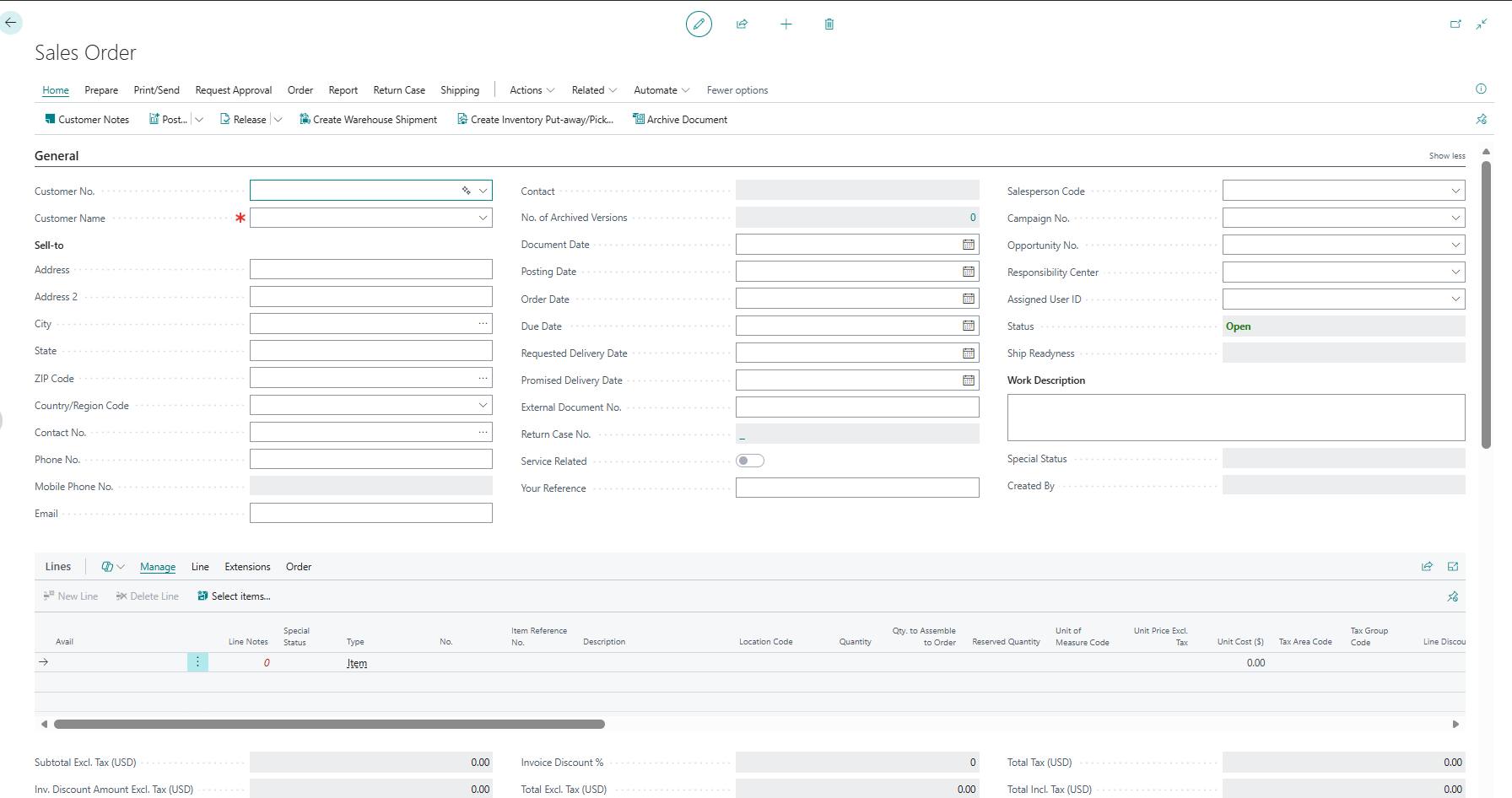
The screen below shows the empty Sales Order workspace before a customer and lines are entered. Header information controls the commercial and delivery context, while the Lines area holds the items or services that will be shipped and invoiced.
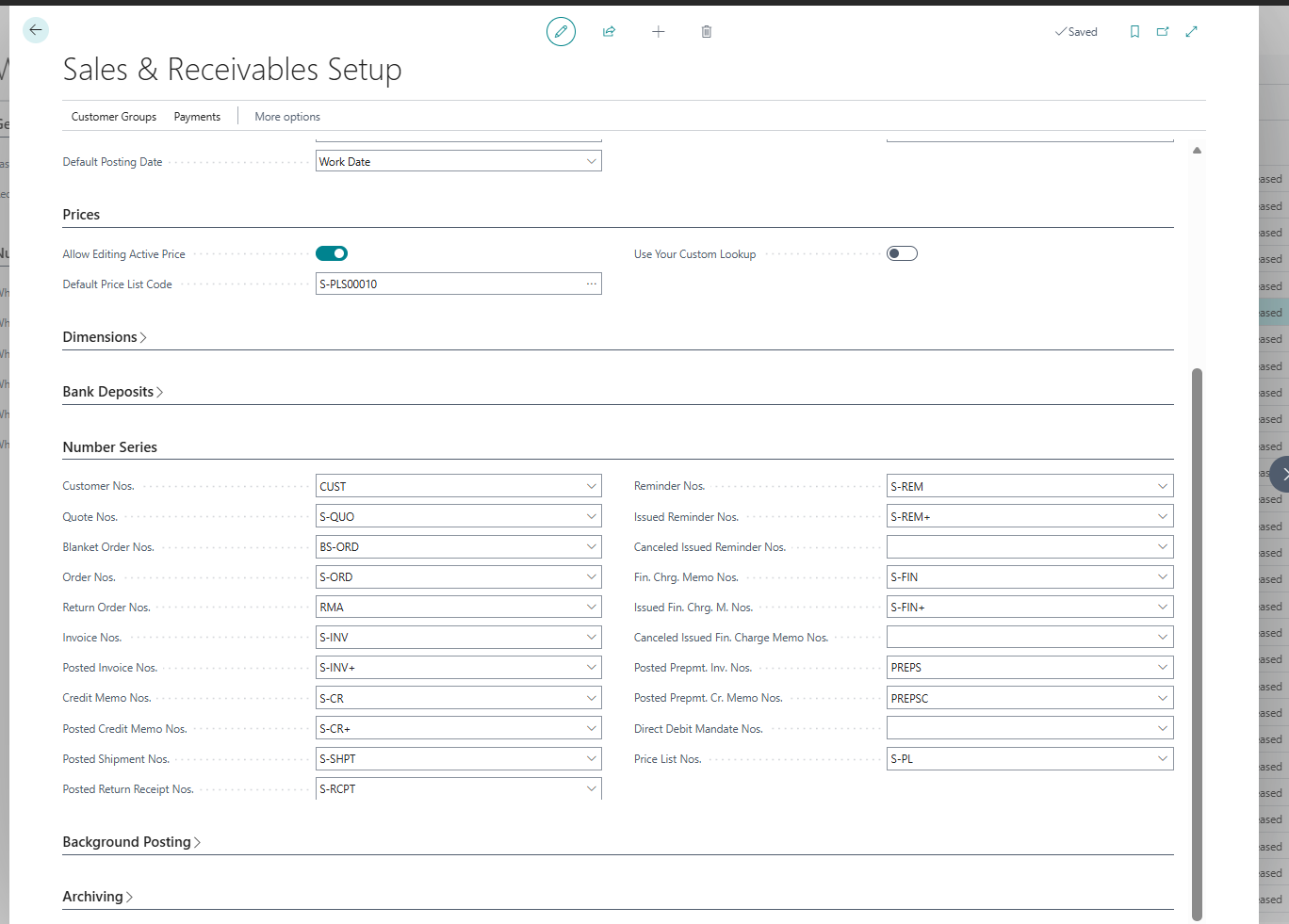
Document numbering is setup-driven rather than typed independently on each order. In a sandbox, review the Number Series section before testing document creation so the resulting order, invoice, shipment, and credit memo numbers can be traced to the intended series.
• Operational execution document
Drives day-to-day sales processing.
• Used for shipping and invoicing
Goods can be shipped and invoices can be posted from this document.
• Can be partially shipped and invoiced
Supports real-world scenarios where deliveries or billing happen in stages.
• Controls inventory movement
Inventory is reduced when shipments are posted from the Sales Order.
Sales Invoice
A Sales Invoice is a billing document used to charge the customer for goods or services.
Unlike a Sales Order, a Sales Invoice focuses purely on financial posting, not operational fulfillment.
Key characteristics of a Sales Invoice:• Directly posts revenue and customer balance
Creates accounting entries that increase accounts receivable and recognize sales revenue.
• Can be created independently or from Sales Orders
Used for immediate billing or for invoicing shipped sales orders.
Posted Sales Shipment
A Posted Sales Shipment records the physical delivery of goods to the customer.
It is created when the shipment part of a Sales Order is posted and serves as a permanent historical record.
Key characteristics of a Posted Sales Shipment:• Historical record of shipped goods
Confirms what was delivered and when.
• Created when shipment is posted
Generated automatically during shipment posting.
• Can be invoiced later
Allows billing to be performed separately from delivery.
Posted Sales Invoice
A Posted Sales Invoice is the final financial document in the sales process.
Once created, it represents a legally recognized transaction and cannot be changed.
Key characteristics of a Posted Sales Invoice:• Legal and financial record
Used for statutory, audit, and compliance purposes.
• Cannot be edited
Ensures data integrity and audit reliability.
• Used for reporting, taxation, and audits
Forms the basis of customer statements, tax filings, and financial reports.
Why This Distinction Matters
Each sales document exists for a specific purpose, and using the correct document at the correct stage ensures:
• Accurate inventory tracking
• Proper revenue recognition
• Correct tax calculation
• Clear audit trails
Understanding these differences is essential before moving deeper into sales posting workflows.
End-to-End Sales Workflow Overview
The complete sales workflow in Business Central typically follows this sequence:
1. Blanket Sales Order (optional)
2. Sales Order creation
3. Release Sales Order
4. Post Shipment
5. Post Invoice
6. Ledger and inventory updates
Not all organizations use every step, but this workflow represents best practice for controlled sales operations.
Blanket Sales Order – Agreement Stage
The Blanket Sales Order is used at the agreement stage of the sales process. It represents a commercial commitment between the company and a customer, but it does not represent an actual sale or delivery.
This document is typically used when customers agree to purchase goods or services over a period of time, with deliveries happening in parts rather than all at once.
What Is a Blanket Sales Order?
A Blanket Sales Order represents a sales contract rather than an operational transaction. It captures the agreed terms of sale but does not trigger inventory movement or accounting entries. In other words, it answers the question: “What has the customer agreed to buy over time?”
Key Points
The following points describe the functional nature of a Blanket Sales Order:
• Used for long-term or bulk agreements
Commonly used for annual contracts, framework agreements, or bulk purchase commitments.
• Defines pricing and total quantity
Stores the agreed prices and total quantities that apply across multiple deliveries.
• Valid for a specific period
Can be limited to a contract start and end date.
• Cannot be posted
Posting actions such as shipment or invoicing are not allowed on this document.
Business Purpose
The Blanket Sales Order exists to support commercial control and planning, not execution.
Its primary business purposes include:• Lock pricing for customers
Ensures agreed prices are consistently applied to all related Sales Orders.
• Plan future deliveries
Helps sales and operations teams forecast demand over time.
• Maintain contract-level visibility
Allows tracking of how much of the agreement has been consumed and how much remains.
What Does NOT Happen in a Blanket Sales Order
Because a Blanket Sales Order is not an execution document, several important system actions do not occur. Specifically:
• No inventory reservation
Stock availability is not affected.
• No ledger entries
No financial or customer ledger entries are created.
• No VAT calculation
Tax is calculated only when invoices are posted.
This separation ensures that financial and inventory data remain accurate until actual sales transactions take place. A Blanket Sales Order is a planning and agreement document, not a transactional one. Actual sales activity begins only when Sales Orders are created from the Blanket Sales Order.
Creating Sales Orders from Blanket Sales Orders
Sales Orders are created using the “Make Order” function from sales quote page.
What Happens Internally• A new Sales Order is generated
• Quantities are deducted from the Blanket Order’s remaining quantity
• Prices, customer, and dimensions are copied
• Blanket Order remains open until fully consumed
This ensures traceability between contract and execution.
Sales Order – Execution Stage
The Sales Order is the central operational document.
Purpose of Sales Order• Manage item availability
• Control shipping
• Control invoicing
• Coordinate warehouse activities
• Customer
• Item or service lines
• Quantity
• Unit price
• Location
• Dimensions
Releasing the Sales Order
Releasing a Sales Order means it is approved for processing, there is a function under Action menu on sales Order for Releasing the document.
Effects of Release• Prevents unauthorized changes
• Allows warehouse and shipping actions
• Locks pricing and quantities
• No inventory reduction
• No accounting entries
Release is a control mechanism, not a posting action.
Posting Sales Order – Shipment Stage
Sales Orders can be posted in different ways. The most important distinction is Shipment vs Invoice.
Posting Shipment OnlyUsed when goods are shipped before billing.
Inventory Impact• Item Ledger Entry created
o Entry Type: Sale
o Quantity reduced
• Value Entry created
o Inventory value reduced
o Cost of Goods Sold (COGS) recognized
• No Customer Ledger Entry
• No G/L revenue posting
• No VAT posting
The result is a Posted Sales Shipment document.
Posted Sales Shipment – Fulfillment Record
A Posted Sales Shipment:• Confirms physical delivery
• Is immutable (cannot be changed)
• Serves as a reference for invoicing
• Deferred billing
• Consolidated invoicing
• Accurate logistics tracking
• From Sales Orders
• From Posted Shipments
• Directly as Sales Invoices
Posting Invoice After Shipment
Financial Impact
• Customer Ledger Entry
o Customer balance increases
• General Ledger Entries
o Sales revenue credited
o Accounts receivable debited
• VAT / GST Entries
o Output tax calculated and posted
Inventory Impact
• None (already handled during shipment)
Posting Ship and Invoice Together
This is the most common scenario for simple sales.
Combined Effects
Inventory
• Item Ledger Entry (Sale)
• Value Entry (COGS)
Accounting
• Customer Ledger Entry
• G/L Revenue Entry
• VAT Entry
Everything happens in one posting action.
Posted Sales Invoice – Financial RecordA Posted Sales Invoice:
• Is the final legal document
• Cannot be edited
• Used for:
o Tax filing
o Customer statements
o Audits
o Financial reporting
Entries Affected by Sales Posting (Detailed)
Inventory Entries• Item Ledger Entry
• Value Entry
• General Ledger Entry
• Customer Ledger Entry
• Detailed Customer Ledger Entry
• VAT Entry
• VAT Posting Setup driven calculations
• Warehouse Shipment Lines
• Bin Content updates
Partial Shipments and Partial Invoicing
Business Central supports real-world constraints.
Partial Shipment• Only available quantity shipped
• Remaining quantity stays open
• Invoice only part of shipped quantity
• Useful for milestone billing
• Posted Shipment
• Posted Invoice
• Ledger entries
Sales Corrections and Credit Memos
In real business scenarios, mistakes can occur after sales documents are posted. These may include:
• Incorrect quantities
• Wrong prices
• Wrong customer
• Returned or damaged goods
• Cancellation of a sale after invoicing
Because posted sales documents cannot be edited, Business Central uses Sales Credit Memos to correct or reverse posted transactions in a controlled and auditable way.
What Is a Sales Credit Memo?A Sales Credit Memo is a document used to reverse the financial and inventory impact of a previously posted Sales Invoice.
It does not delete or modify the original invoice. Instead, it creates new reversing entries that offset the incorrect postings.
In simple terms, it answers the question:
“How do we correct a sale that was already posted?”
A Sales Credit Memo is used when:
• An invoice was posted incorrectly
• Goods are returned by the customer
• A full or partial refund is required
• A pricing or tax error is discovered after posting
It ensures corrections are made without breaking audit trails.
Financial Impact of a Sales Credit Memo
When a Sales Credit Memo is posted, Business Central creates reversing entries that affect multiple ledgers.
Revenue Reversal• Sales revenue is reduced
• The original revenue entry is offset
• Financial reports reflect the corrected sales amount
• Output VAT or GST is reversed
• Tax liability is reduced accordingly
• Ensures accurate tax reporting and compliance
• Customer Ledger Entry is created
• The customer’s outstanding balance is reduced
• Can be applied against the original invoice
These actions explain why a Credit Memo is not just a negative invoice, but a structured correction mechanism.
Inventory Impact of a Sales Credit Memo
Inventory behavior depends on the nature of the correction.
Inventory Can Be Returned to Stock• Used when goods are physically returned
• Item Ledger Entries increase quantity
• Inventory value is adjusted through Value Entries
• Product returns
• Defective goods received back into stock
• Used when goods are not returned
• Items are damaged, lost, or scrapped
• Inventory is not increased
This ensures inventory records reflect physical reality, not just accounting corrections.
Relationship Between Credit Memo and Original Invoice
A Sales Credit Memo:
• References the original Sales Invoice
• Can be applied fully or partially
• Maintains traceability between documents
This linkage allows:
• Clear audit trails
• Easy reconciliation
• Accurate customer statements
A Sales Credit Memo:
• Does not modify the original posted invoice
• Does not hide errors
• Does not bypass accounting controls
Instead, it ensures corrections are:
• Transparent
• Traceable
• Compliant with accounting standards
Using Sales Credit Memos correctly ensures:
• Financial accuracy
• Proper tax compliance
• Clean audit trails
• Correct customer balances
• Trust in financial reporting
Improper handling of corrections can lead to:
• Misstated revenue
• Incorrect VAT reporting
• Audit issues
A Sales Credit Memo is the only correct way to reverse or correct a posted sales transaction in Business Central. It preserves system integrity while allowing necessary business corrections.
Why Understanding Sales Workflow Matters
The sales workflow in Business Central is not just a sequence of documents—it is a controlled chain of operational and financial events. Every action taken in the Sales module has a direct impact on inventory valuation, revenue reporting, tax compliance, and audit reliability.
When users do not clearly understand how sales documents interact, mistakes often occur. These mistakes are rarely visible immediately, but they surface later as financial discrepancies, reconciliation issues, or audit observations. Because posted documents cannot be edited, correcting such mistakes becomes time-consuming and error-prone.
Incorrect handling of sales processes can lead to serious consequences, such as:
• Wrong inventory valuation, where stock quantities or costs do not reflect physical reality
• Incorrect revenue recognition, resulting in misstated financial statements
• VAT or GST compliance issues, including underreported or overreported tax
• Audit failures due to missing or unclear transaction trails
On the other hand, a clear understanding of the sales workflow allows organizations to operate with confidence and control. Users know when inventory should be affected, when revenue should be recognized, and how customer balances are calculated.
A proper understanding of the sales workflow ensures:
• Accurate financial statements that reflect true business performance
• Clean and traceable audit trails linking documents to ledger entries
• Controlled sales operations with minimal correction and rework
In practical terms, this knowledge helps users:
• Choose the correct document for each business scenario
• Avoid premature or incorrect posting
• Handle exceptions such as partial shipments and credit memos correctly
Understanding the Sales workflow is essential for maintaining data integrity across inventory, finance, and taxation. It is not optional knowledge—it is foundational to running Business Central correctly.
Conclusion
The Sales module in Microsoft Dynamics 365 Business Central is far more than a tool for issuing invoices. It is a fully integrated workflow that connects customer agreements, operational execution, inventory movement, and financial accounting into a single controlled process.
Each sales document serves a specific purpose and contributes to maintaining data accuracy across the system. When these documents are used correctly, businesses can ensure reliable inventory valuation, proper revenue recognition, and compliant tax reporting. This structured approach reduces errors, improves transparency, and supports scalable sales operations as the business grows.
In summary, effective use of the Sales module enables:
• Accurate and traceable sales transactions
• Controlled inventory and financial postings
• Scalable and audit-ready sales processes
Practical check: Trace Value Entries from a one-unit sale
Post shipment and invoice for one unit of a known item. Keep the quantity small and capture the document number so the ledger trail is easy to inspect.
Steps and evidence to inspect
- Compare item quantity before and after posting.
- Open the Item Ledger Entry and its Value Entries; note cost amount, sales amount, expected/actual flags, and document number.
- Open customer and G/L entries and reconcile selling price, tax, receivable, revenue, and cost where posting is configured.
Expected result
Quantity decreases by one and the financial trail can be followed without manually changing ledger records. Cost may be adjusted later, which is why the Value Entry history matters.
If the result is different
Missing or provisional cost can result from expected cost, unadjusted inbound costs, or disabled automatic cost posting. Run the correct sandbox cost processes and inspect application links before declaring the sale incorrectly posted.
Version and implementation boundary
Exact account and tax results depend on setup, localisation, costing method, and posting timing. Use production-like data when validating margin reports.
Authoritative reference: Microsoft Learn — Sales quick start. The scenario and interpretation above are original to ScrutnLearn.