

Triggers in AL are predefined execution points that automatically run AL code when a specific system-driven or user-driven event occurs in Microsoft Dynamics 365 Business Central. These events can be related to data entry, database operations, page interaction, report execution, data import or export, or internal system lifecycle actions.
Triggers are invoked entirely by the Business Central platform. Developers cannot call triggers explicitly, control their execution order, or bypass them through normal coding practices. This automatic nature is what makes triggers a core mechanism for enforcing consistency, correctness, and reliability across the application.
From a design perspective, triggers represent where the platform hands control to the developer. They are not optional hooks but built-in execution points that define how Business Central behaves internally.
Why Triggers Are Important
Triggers form the backbone of Business Central’s internal behavior. Every major business process in the system relies on triggers to ensure that validations, calculations, and business rules are applied consistently.
Whenever a user enters data, modifies a record, posts a document, or runs a report, multiple triggers are executed behind the scenes. These triggers ensure that:
• Invalid data cannot be committed to the database
• Business rules are enforced uniformly
• Dependent values are recalculated correctly
• Processes behave the same regardless of how they are initiated
Without triggers, Business Central would not be able to maintain data integrity or automate complex business processes across sales, purchasing, inventory, finance, manufacturing, and jobs. Triggers ensure that logic executes not only during user interaction, but also during background processing, integrations, and system-driven operations.
Understanding Triggers Conceptually
A trigger is best understood as a guaranteed execution point in the system lifecycle. When a specific event occurs, the runtime checks whether a trigger exists for that event. If it does, the AL code inside the trigger is executed automatically before the system proceeds further.
If the trigger raises an error, the operation is stopped immediately and the transaction is rolled back. This behavior makes triggers especially powerful for enforcing validations and preventing invalid system states.
Because triggers are enforced by the platform itself, they provide a level of safety and consistency that cannot be achieved through manual procedure calls alone.
Where Triggers Are Used in Business Central
Triggers are available across multiple AL object types. Each object exposes a set of triggers that align with its purpose and role in the system. This allows developers to inject logic at precise and appropriate points in the execution lifecycle.
Table Objects
Table triggers execute during database-level operations such as inserting, modifying, deleting, renaming records, or validating field values. These triggers operate at the data layer and are executed regardless of how the data change is initiated.
Table triggers are primarily used to:
• Enforce business rules
• Validate data
• Maintain data consistency
• Initialize default values
Because table triggers apply universally, they are the most reliable place for critical business logic related to data integrity.
Field-Level Validation (OnValidate)
Field-level OnValidate triggers execute whenever a field value is validated. Validation occurs not only when a user changes a value on a page, but also when values are assigned in AL code, imported through XMLPorts, or modified through integrations.
This ensures that validation logic is always applied consistently.
Typical uses of OnValidate triggers include:
• Preventing invalid values
• Updating dependent fields
• Recalculating amounts
• Triggering related calculations
Because of their frequency of execution, OnValidate triggers should remain lightweight and focused.
Page Objects
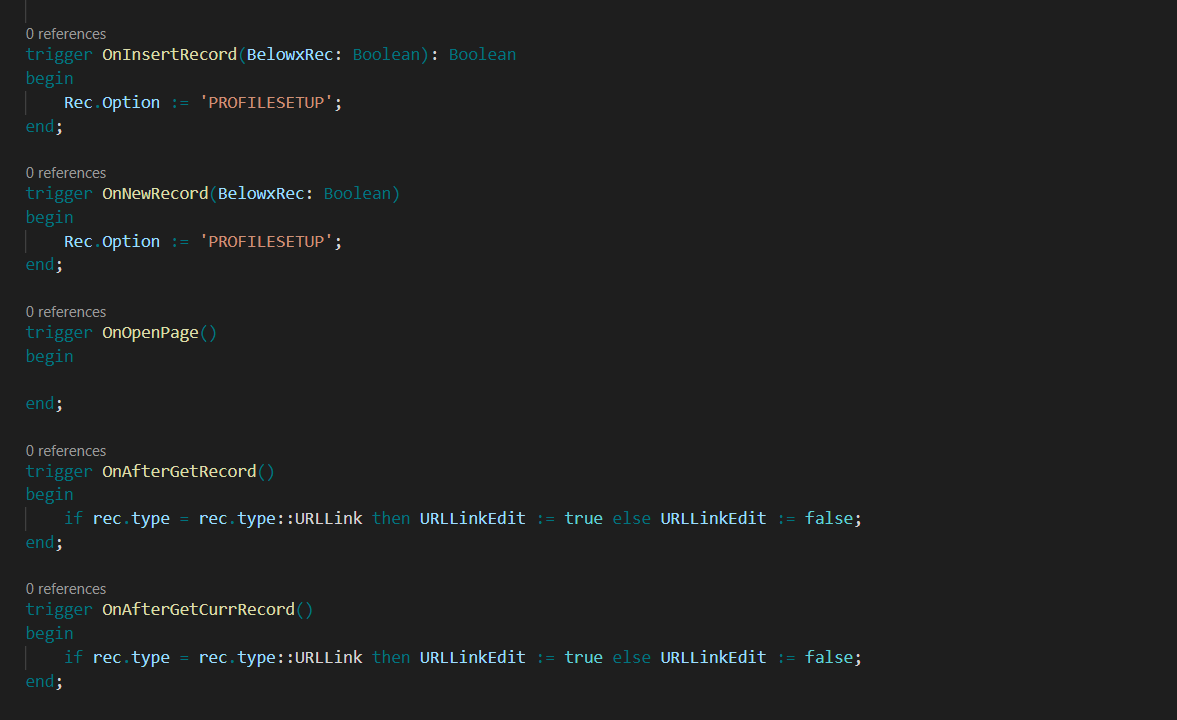
Page triggers execute when users interact with the Business Central user interface. These triggers are responsible for controlling page behavior and responding to navigation and interaction events.
Common page triggers execute when:
• A page opens or closes
• A new record is created
• The current record changes
• Records are inserted, modified, or deleted through the page
Page triggers are typically used to:
• Control visibility or editability of fields
• Display messages or notifications
• Calculate values for display
• React to user navigation
Page triggers should not contain core business logic. Their responsibility is user interaction and presentation, not enforcement of data rules.
Report Objects
Report triggers execute during the lifecycle of report processing. Reports in Business Central follow a defined execution flow that includes initialization, data item processing, and completion.
Report triggers allow developers to:
• Initialize variables
• Apply filters dynamically
• Perform calculations during data processing
• Clean up resources after report execution
These triggers are essential for controlling how data is prepared and presented in reports.
Request Pages
Request page triggers execute when users interact with the request page of a report. These triggers run before the report itself starts processing.
They are commonly used to:
• Set default filter values
• Validate user input
• Enable or disable options dynamically
Request page triggers ensure that reports receive valid and meaningful parameters before execution begins.
XMLPorts
XMLPort triggers execute during data import and export operations. They allow developers to control how external data is transformed, validated, and stored within Business Central.
XMLPort triggers are commonly used to:
• Validate incoming data
• Map external structures to internal tables
• Handle errors during import
• Control export formatting
These triggers play a critical role in integrations and data exchange scenarios.
Query Objects
Query triggers execute during query execution. Although queries are primarily read-only, their triggers allow limited control over execution behavior.
They are typically used to:
• Apply dynamic filters at runtime
• Prepare parameters before execution
• Perform logic immediately before or after the query opens
High-Level Classification of Triggers
From a functional perspective, triggers can be grouped based on the type of operation they handle.
Data TriggersData triggers handle database-related operations such as validation, insertion, modification, deletion, and renaming of records. These triggers are essential for maintaining data integrity and enforcing business rules.
UI TriggersUI triggers respond to user actions on pages. They control how the application behaves from the user’s perspective and are responsible for user experience and interaction flow.
Execution TriggersExecution triggers control the lifecycle of reports, XMLPorts, and queries. They manage preprocessing, execution flow, and postprocessing logic.
How Triggers Work Internally
When a user or background process performs an action, the Business Central runtime detects the event and checks whether a trigger exists for that event. If a trigger is defined, the runtime executes the AL code inside the trigger automatically.
If the trigger completes successfully, the system continues with the operation. If the trigger raises an error, the operation is stopped and any changes are rolled back. This mechanism ensures that invalid operations cannot partially complete.
This internal behavior is consistent across all object types and is a key reason why triggers are trusted for enforcing critical system rules.
The following example demonstrates how a trigger prevents invalid data from being saved:
Field Validation Using a Trigger
table 50100 "Sample Table"
{
    fields
    {
        field(1; Quantity; Integer)
        {
            trigger OnValidate()
            begin
                if Quantity < 0 then
                    Error('Quantity cannot be negative.');
            end;
        }
    }
}
In this example, the OnValidate trigger runs automatically whenever the field value changes. If the validation fails, the record is not saved and the operation is stopped.
The following example shows how a page trigger executes logic when a page opens:
Page Initialization Using a Trigger
page 50101 "Sample Page"
{
    trigger OnOpenPage()
    begin
        Message('Welcome to the page.');
    end;
}
This trigger runs when the page is opened and is used for user-interface-related logic.
Trigger Execution Rules
Triggers always execute automatically and in a predefined sequence controlled by the platform. Developers cannot manually invoke triggers or change their execution order.
Some triggers can stop execution by raising an error, while others are informational and cannot block processing. Understanding these rules is essential when designing reliable logic.
Triggers vs Event Subscribers
Triggers are tightly bound to the object in which they are defined. They define the core behavior of that object.
Event subscribers, on the other hand, are loosely coupled and designed for extensibility. Modern Business Central development favors event-driven architecture for customization, but triggers remain essential for defining fundamental object behavior.
Both mechanisms serve distinct purposes and are often used together.
Best Practices for Using Triggers
Triggers should be used primarily for validation, control, and lightweight logic. Complex or long-running processes should be implemented in codeunits or through event subscribers.
Overloading triggers with heavy logic can negatively affect performance, readability, and maintainability.
Summary
Triggers are automatic execution points that respond to system and user actions in Business Central. They are essential for enforcing business rules, validating data, and controlling execution flow.
A clear understanding of triggers is foundational to understanding how Business Central works internally. When used correctly and deliberately, triggers provide a reliable and consistent base for building robust Business Central solutions.
Practical check: Compare page-field and table-field validation
A custom inspection date cannot be earlier than the work date. Add the durable rule to the table field and use page validation only for UI feedback that does not own the rule.
Steps and evidence to inspect
- Enter an invalid date through the page and record the error.
- Attempt the same invalid value through a small codeunit using Validate and confirm the table rule still applies.
- Assign the field directly without Validate in a sandbox test to observe why callers must use supported validation paths.
Expected result
The rule is consistent when field validation is invoked from different callers. Page-specific feedback can change without duplicating the business condition.
If the result is different
Unexpected order or recursion often comes from one trigger validating another field or modifying the same record. Trace xRec/Rec values and call paths before adding guards.
Version and implementation boundary
Triggers can be bypassed by certain direct assignments or APIs depending on code design. Combine correct trigger placement with tests of every supported entry path.
Authoritative reference: Microsoft Learn — Triggers overview. The scenario and interpretation above are original to ScrutnLearn.